
Risk & assurance
Enterprise Risk Management
A risk register that keeps pace with the business.
Connect risks, key risk indicators, mitigation plans and control responsibilities in one working view. Arukus ERM helps risk owners see what is changing, why it matters and where action is overdue.
Plan your product walkthroughFrom a risk statement
to a response you can review.
Explore the screens used to identify and assess risks, record controls and mitigation, and give indicators the context needed for review.
See the risk picture. Find what needs attention.
The dashboard brings the risk grid, prioritised risk list, ownership gaps and trend views into a management workspace, helping reviewers move from an overview to the records behind it.
- Pre- and post-mitigation perspectives alongside target views
- Orphan-item counts for risk, control, mitigation and KRI roles
- Risk-score and control-trend charts with organisation and unit indicators
Original supplied web screenshot. Figures illustrate the captured implementation; they are not typical results, real-time guarantees or evidence that risk has been reduced.
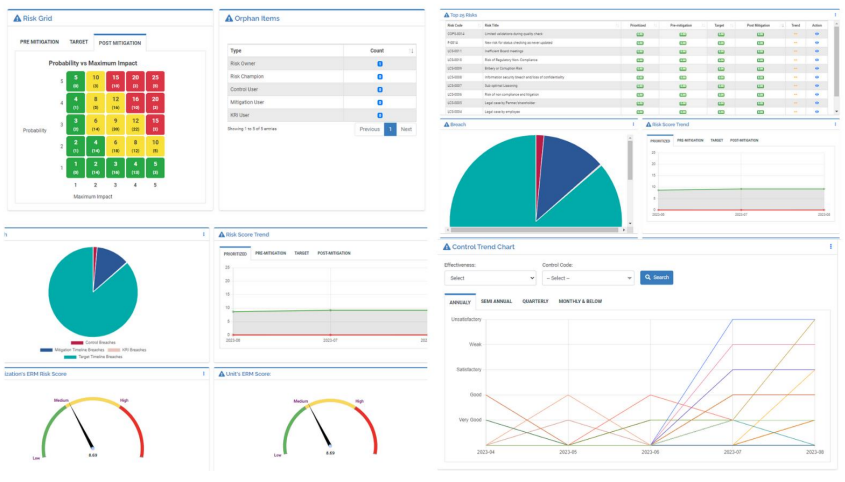
These six supplied examples are web interfaces from a configured implementation. Identifying staff and reference details are blurred in four views, without censor boxes. Edited copies may contain small visual differences. Scoring, indicator definitions, permissions and review responsibilities are configured for the organisation.
A quarterly risk review is only useful if the register reflects what has happened since the last meeting. A new indicator value, a delayed mitigation measure or a change in business impact can alter the decision a risk owner needs to make.
What better could look like
See the reason behind a changed score
Review indicator movement and its operating context before deciding the response.
Keep mitigation work owned
Review dates, progress and the person responsible for the next action.
Bring control reviews into the conversation
Examine effectiveness alongside the exposure the control is intended to address.
The people using the product
Risk owner
Reviews exposure and the agreed response.
KRI owner
Maintains the indicator and explains a threshold breach.
Process or department head
Owns mitigation and control follow-up.
Management reviewer
Examines trends, weak controls and overdue actions.
A risk register should keep moving.
From a changing indicator to a reviewed response.
KRI signal
An owner reviews the indicator, its threshold and the reason for a breach.
TO EXPLORE
Follow the movement, not just the score
Arukus Enterprise Risk Management connects the initial assessment with ongoing monitoring. The scoring model uses probability and maximum impact to calculate a score on a 1–25 grid. Changes to either input recalculate the score, making movement visible rather than leaving the original assessment untouched.
Record the inherent risk and the target the organisation intends to reach. Review the current score alongside the measures underway, so that a lower number can be examined in context rather than accepted without explanation.
Put KRIs in the hands of named owners
Each key risk indicator has an owner, thresholds and a current value. Values can be entered by the responsible user or calculated from enterprise-system parameters through agreed integrations and predefined ranges.
When a manually updated value falls outside its permitted range, the application flags a breach. The KRI owner can explain the root cause and record corrective action. Risk owners manage changes in impact, keeping responsibility for the assessment explicit.
- Review assigned KRIs and their acceptance status.
- Identify indicators awaiting review.
- Examine threshold breaches alongside the explanation.
- Agree data sources, update frequency and ownership before connecting operational systems.
Keep mitigation and controls distinct
A mitigation plan describes work being undertaken to address a risk. A control describes the measure expected to keep exposure within an acceptable level. They need different conversations, even when the same people contribute to both.
Track mitigation dates, monitoring frequency, progress and remarks. For controls, assign a primary responsible person and review effectiveness on a 0–100 scale. Status indicators help reviewers locate weak or incomplete measures without reading every entry in full.
Related risks can also be linked to the main risk. That relationship helps teams examine whether a change in one process could alter the probability or impact elsewhere.
Give management a usable risk picture
Reports cover risks by score and department, contributing factors, root-cause analysis, risk trends and timeline breaches. Leadership can start with an organisation-wide view, then examine the risks and responsibilities behind it.
The configuration includes departments, locations, user groups, risk classes, processes, impact areas, strategies and KRI masters. Arukus has financial-services experience, but these concepts also apply to insurance, manufacturing, retail groups and service organisations. The assessment must use each organisation’s own terminology, ownership and risk appetite.
Start with the register you already use
Bring a sample risk register, a KRI catalogue and one recent review pack. We can map the scoring method, responsibilities and reporting needs against the product. This is the point to identify configuration changes and interfaces, rather than assuming a familiar-looking grid means the underlying methodology is the same.
What we can cover in a walkthrough
- Identify a risk
- Assess the exposure
- Assign a response
- Review progress
Useful examples to bring: Risk register; KRI definition; a recent threshold breach
Where the product can help
Departments working from different risk lists
A finance team records payment concerns while operations tracks service interruptions. A shared assessment structure makes the review easier to compare, with ownership and context retained for each item.
Multiple locations, one management review
A manufacturer or service group can assess location-level risks before preparing a central review. Each unit keeps responsibility for its response; management can see what needs attention across the organisation.
Questions for a considered decision
How does the risk score change?
In the documented model, probability and maximum impact determine a score from 1 to 25. A change in either input recalculates it. KRI values inform probability, while the designated risk owner manages impact.
Can we use our own risk framework?
Configuration covers risk classes, processes, departments, KRIs and other masters. We review your scoring methodology and risk appetite first, then identify configuration differences or additional work.
Do KRI values have to be entered manually?
They may be entered by assigned owners or calculated from operational-system parameters through an agreed integration. Source ownership, thresholds and update frequency need to be defined.
What should our first ERM rollout cover?
Choose a defined risk area, its owners, KRIs and review cycle. Use a changed indicator and an overdue mitigation to test how the register supports the next management decision.
How do we judge whether the register is staying useful?
Review stale indicators, unassigned mitigations, overdue reviews and the evidence behind score changes. These operating measures provide a more useful baseline than the number of risks entered.
What does implementation involve?
We agree configuration, data preparation, required interfaces, acceptance examples, training and rollout responsibilities. The delivery plan follows the scope.
How are deployment and integrations decided?
We review the chosen product, available interfaces, hosting requirements and operating owners. A named external system is not assumed to be connected out of the box.
Capabilities to explore in your walkthrough
- 01Risk identification, classification and related risks
- 02Dynamic scoring linked to KRI values and impact
- 03Inherent and target risk scores
- 04KRI owners, thresholds and breach explanations
- 05Mitigation timelines and control effectiveness
- 06Department, risk trend and root-cause reporting
A practical next step, when the process is ready.
A proposed AI assistant could summarise changes since the last review, assemble source-linked risk commentary and group recurring breach explanations. Risk owners would review the evidence and retain responsibility for scores, controls and treatment decisions.
Discuss an AI pilotResources for your evaluation

Closing Plant Audit Findings Without Losing the Evidence
An inspection identifies the issue. Clear ownership and verified closure determine whether anything changes.
Explore
Making Insurance Branch Risk Reviews Useful Between Reporting Cycles
Risk visibility improves when local observations, mitigation owners and evidence of follow-through remain connected.
Explore
Why Employee Requests Keep Bouncing Between IT, Admin and Finance
Internal requests move faster when ownership survives each handover between departments.
ExploreAfter the inspection, keep action moving.
An illustrative manufacturing scenario about clearer evidence, ownership and follow-through.
Illustrative scenario • Not a customer deployment or a measured success claim.ExploreSee Enterprise Risk Management in the context of your business.
Bring a sample process, a recent operating report and the people responsible for the work. We will focus the walkthrough on your requirements, available configuration and implementation scope.
Plan your product walkthrough