
Field & operations
Expense & Travel Management
Every expense.
Under control.
Capture employee travel expenses, branch petty cash and rent-related expenses through the mobile app. Records are stored in the cloud database, with policy-based approvals and finance review in one place.
Explore your expense workflowsA tour plan, branch expense or rent request starts with the details and supporting records needed for review.
See the work across your teams.
Explore the application screens.
Follow tour planning, claims, branch expenses, employee lodging, reporting, rent agreements and role configuration through these ten application views.
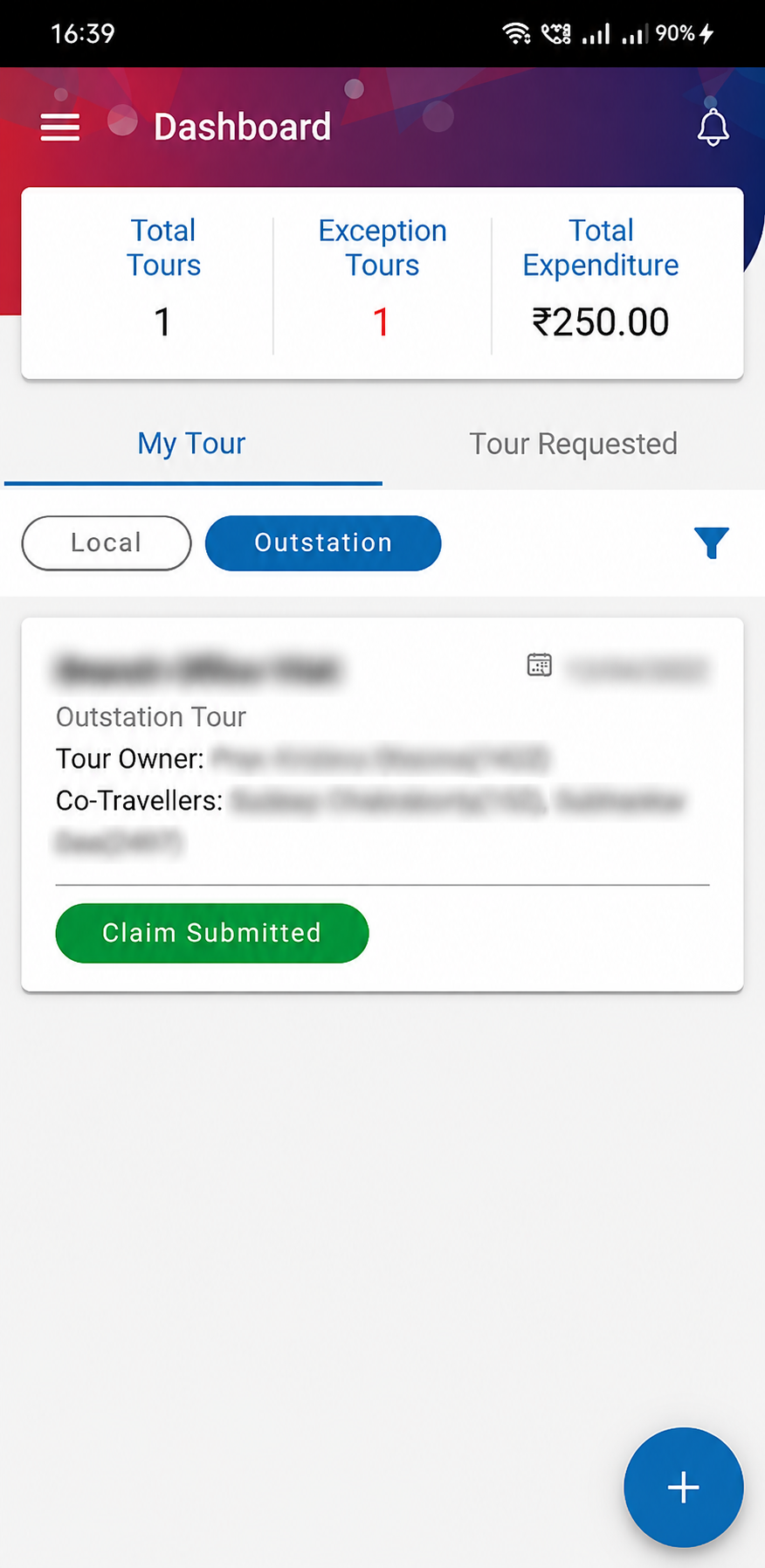
Follow tours and exceptions from the dashboard.
The dashboard brings tour counts, exception tours and expenditure together with the employee’s tour list.
- My Tour and Tour Requested views
- Local and Outstation filters
- A tour card with the recorded claim status
Privacy-edited dashboard. Tour owner, co-traveller identifiers and tour-specific details are blurred.
These application screens cover tour planning, claims, branch expenses, lodging, reporting, rent tracking and role configuration. Client logos have been removed where present, and identifying records remain blurred. Privacy-edited copies may contain small visual differences from the originals. The tall and wide layouts retain their supplied proportions.
Start with the work your team needs to manage.
Travel, branch expenses and rent share the need for accountability. Each keeps the forms, roles and review steps appropriate to its own process.
Travel Expense Management
From Local or Outstation Tour Plans to co-traveller acceptance, booking requests, policy exceptions and reimbursement, keep the journey and its approvals connected across mobile and web.
An employee requests a flight and hotel for a shared visit. Co-travellers confirm participation, the authorised person reviews an entitlement exception, and the approved booking moves to Admin. The later claim stays linked to the tour.
Functional scope is based on the supplied product brief. The supplied interface references show rent administration, accounts, reports and notifications.
An employee planning a visit, a Branch Head recording petty cash and an administrator renewing a lease face different tasks. They share a need for a complete record, a clear approval route and an accountable handover to finance. Arukus brings these responsibilities into three complementary modules: Travel Expense Management, Branch Expense Management and Rent Management. Travel, petty cash and rent-related expenses are captured through the mobile app and stored in the cloud database, rather than retained as expense records on the mobile device.
What better could look like
Give travel a connected record
Keep the tour plan, co-traveller acceptance, booking requests and reimbursement context together.
Make branch spend easier to follow
Review monthly budget utilisation, amount-based approvals and expenses waiting for action.
Keep rental commitments visible
Follow expiry, amendments, shifting, deposits and monthly payable or receivable amounts.
The people using the product
Employees and co-travellers
Plan tours, confirm participation and submit the applicable expenses.
Branch Heads
Record petty cash and monitor expenses against the monthly budget.
Managers and designated approvers
Review entitlements, exceptions and assigned or escalated expenses.
Admin and rent teams
Coordinate bookings, rental documents and agreement lifecycle actions.
Accounts teams
Verify reimbursement claims, review rent statements and follow payment references.
Operations leaders
Review pending work, branch expenditure and rental commitments across locations.
Different requests. Clear review. A traceable handover.
Follow the operating record from a tour, branch expense or rental event to its next responsible team.
Capture the context
Record the tour, petty cash expense or rental event with its supporting details.
TO EXPLORE
Travel planning, acceptance and bookings
Employees can create Local and Outstation Tour Plans through the mobile app, for themselves or other employees. Each plan captures the purpose, travel dates, passengers, co-travellers, remarks and supporting documents. Incomplete plans can stay in draft and be edited before submission.
Flight, Train, Car and Hotel booking requests sit under the relevant tour, with multiple bookings supported for one journey. The Admin Department processes these requests against the organisation’s travel policy.
Co-traveller acceptance is a defined step in the workflow. SMS confirmation links are sent to the respective employees, and every co-traveller must accept before the tour moves forward. Manager approval and Admin booking confirmation then provide clear checkpoints for the next responsibility.
Travel-class selections are checked against the employee’s permitted entitlement. An out-of-policy selection follows the exception route to the authorised person before it proceeds to the Admin Department. The exception remains a request for a decision, rather than an undocumented bypass.
Tour expenses, reimbursement and Accounts review
After a tour, employees can submit the applicable Travel, Local Conveyance, Hotel or Lodging, Food and Miscellaneous expenses. Additional expenditure can be recorded against the same tour, keeping the claim connected to the journey that created it.
The web portal gives administrators separate views of tour details, passengers, bookings and approval status. Employees and administrators can follow progress through dashboard statuses and notifications at key points, including acceptance, approval, booking confirmation and claim submission.
Reimbursement claims move to Accounts for verification and approval, with the designated users able to approve or reject them. Approval leads into the employee reimbursement process. The payment method, accounting interface and source of settlement confirmation are established for the deployment; an approved claim should remain distinguishable from a completed payment.
Branch petty cash against the monthly budget
Branch Heads can record petty cash expenses in the mobile app against the relevant monthly budget or expense cycle. The dashboard brings the branch budget, recorded expenses and total expenditure into view so users can follow utilisation during the month.
An expense entry captures its date, expense head, amount and remarks. Users can add the relevant expense heads and review individual entries, with editing or deletion available where the workflow permits it.
The monthly view keeps individual entries in the context of the branch’s expenditure. It supports conversations about what has been recorded, what remains pending and how the total relates to the available budget.
Amount-based approvals and escalation
Branch expenses follow the applicable amount and budget-category route. Designated reviewers can include the Area Manager, Regional Head, Zonal Business Head and Accounts, according to the configured approval matrix.
Assigned and Escalated tabs separate a reviewer’s pending responsibilities. If the first-level approver does not act within the defined timeline, the expense moves to the next-level escalation bucket. Both the assigned and escalated approvers can act while the item remains pending; once one records an approval or rejection, the expense is removed from the other approver’s corresponding action screen.
Rejection requires a reason of at least 20 characters. This gives the submitting team a usable explanation and makes the decision easier to review. Amount slabs, escalation timelines and permitted actions are agreed around the organisation’s actual operating policy.
Rent requisitions and the agreement lifecycle
Rent Management covers branch and regional-office agreements from the initial requisition through renewal, amendment and termination. A requisition brings together office details, landlord information, KYC, tax and bank-account records, rent and security deposit details, with the supporting documents needed for review.
The approval route can involve Regional Admin, Zonal Admin, Regional Head, Admin Head and other authorised stakeholders. Rent amount slabs and the configured route matrix determine the applicable responsibilities.
Renewal can be initiated 75 days before agreement expiry, with provisions for rent increments and tenure extensions. Dedicated workflows support landlord modification and agreement amendments, including rent increases or decreases, agreement extensions, premises changes and landlord bank-account changes.
Termination handling covers normal cases and cases following a landlord’s death, with the applicable templates, approvals and settlement options. Branch shifting carries the existing branch and rental details into the new-premises process, following the current Rent Route Matrix for approval.
Rent accounts, deposits and transaction history
The rent accounts workflow calculates monthly rent-related transactions for each branch, identifies payable and receivable amounts and prepares consolidated monthly statements. These records give Accounts visibility of the amount to pay or receive and the calculation behind the handover.
The supplied interface includes Live Rents, Rent Master, Rent Payment Register, Payable for Accounts, Hold Transaction, Reject Transaction, Completed Transaction and an Export Tally Report option. Report export supports an accounting handover; a direct connection to an accounting system is assessed separately.
Rent and security deposit records retain UTR details alongside the relevant transaction history. Approval, amendment and termination histories help a reviewer follow how an agreement or amount reached its current position.
Reports, notifications and a practical rollout
The rent tracker supports a focused review by region, branch, status, agreement expiry, rent amount and owner, as shown in the supplied screen. Report options include rent, pending approvals, completed or pending approvals, expiry counts, completed rent, tour management, rejected rent and escalation reports.
Push and email notifications support the rent approval stages, alongside document uploads, downloads, verification and approval. The supplied notification and email examples show how the relevant rent or landlord event is brought back to the responsible person.
Start a walkthrough with one real example from each module you need: a tour with a policy exception, a branch expense awaiting escalation or an agreement nearing renewal. We can map the forms, approval limits, role access, notification services, opening records and finance handovers before agreeing the rollout scope.
What we can cover in a walkthrough
- Plan a tour
Add co-travellers, bookings and a travel-policy exception.
- Follow a reimbursement
Review the tour-linked claim and Accounts handover.
- Record branch petty cash
Check expense heads and the monthly budget.
- Test an escalation
Follow an assigned item, escalation and reasoned rejection.
- Review a rent lifecycle event
Examine renewal, amendment, landlord change or shifting.
- Prepare the rent Accounts view
Review statements, deposits, UTR details and reports.
Useful examples to bring: An anonymised tour and claim; travel policy and entitlement table; branch budget and approval slabs; escalation rules; a rent agreement and route matrix; a sample monthly rent statement.
Where the product can help
A travelling field or sales team
Keep a multi-person tour, several booking requests, policy exceptions and the eventual reimbursement tied to one journey.
A distributed branch or store network
Give local heads a mobile route to record petty cash, with monthly budgets and approvals that reflect expense amounts.
An organisation with multiple leased offices
Follow rental agreements, landlord changes, renewals, branch shifting and the monthly Accounts handover across locations.
Questions for a considered decision
Does the product cover more than travel claims?
Yes. The scope described here includes Travel Expense Management, Branch Expense Management and Rent Management. We agree the modules and rollout sequence around the processes you need.
Can one tour include other employees and several bookings?
Yes. An employee can plan a tour for themselves or other employees and add Flight, Train, Car and Hotel requests under that tour. Every co-traveller must accept before it advances.
How are travel policy exceptions handled?
Travel-class selections are checked against the employee’s permitted entitlement. An exception is routed to the designated authority for approval before it proceeds to the Admin Department.
What happens when a branch expense is not actioned?
After the configured timeline, the pending expense appears in the next-level escalation bucket. Assigned and escalated reviewers can act; once one does, the expense leaves the other reviewer’s corresponding action screen.
Is a rejection reason required?
For branch expense approvals, rejection requires a reason of at least 20 characters. This records an explanation that the submitting team and subsequent reviewers can use.
How early can rent renewal begin?
The described workflow supports initiating renewal 75 days before the agreement expires, including review of the rent increment and tenure extension.
Can rent amendments, landlord changes and branch shifting be managed?
Yes. The described scope includes dedicated landlord-modification and amendment workflows, normal and death-related termination cases, and branch shifting through the current Rent Route Matrix.
Does approval automatically transfer money?
Approval and payment are distinct stages. The product supports Accounts review, reimbursement processing and rent transaction records, including UTR details. The payment method, interfaces and settlement confirmation are agreed for the deployment.
Can we use our current accounting system?
The supplied rent interface shows an Export Tally Report option. The required export format, reconciliation process and any direct accounting or payment integration are reviewed against the systems you use.
Can this fit industries outside microfinance?
Travel, branch costs and leased premises are common across many distributed organisations. We assess policy, terminology, role structure and finance requirements for your industry before confirming fit.
Where are mobile expense records stored?
Travel, branch petty cash and rent-related expenses are captured through the mobile app and stored in the cloud database. The mobile device provides the capture interface; the expense records are not stored on the device.
Capabilities to explore in your walkthrough
- 01Local and Outstation Tour Plans, drafts and supporting records
- 02Flight, Train, Car and Hotel requests within a single tour
- 03Co-traveller SMS acceptance, manager review and booking confirmation
- 04Entitlement checks and authorised travel-policy exception handling
- 05Tour-linked claims, additional expenditure and Accounts verification
- 06Monthly branch budgets, expense heads and mobile petty cash entry
- 07Amount-based approval routes, Assigned and Escalated queues
- 08Mandatory branch-expense rejection reasons and coordinated decision handling
- 09Rent requisitions, amount-slab matrices and document approvals
- 1075-day renewal initiation, amendments and landlord modifications
- 11Normal and death-related termination, plus branch shifting
- 12Monthly rent statements, deposits, UTR history and report exports
A practical next step, when the process is ready.
An optional document-processing pilot could prepare receipt or agreement fields for review. This would be a separate extension, with source checks and a named reviewer before any output enters an approved claim or rental record.
Discuss an AI pilotResources for your evaluation

A Doctor Visit Is Logged. What Happens to the Follow-up?
A visit location is one piece of evidence. The purpose, outcome and next responsibility make that visit useful to the wider business.
Explore
When a Field Job Cannot Be Completed: Who Owns the Next Step?
Arrival confirms presence. A usable job outcome explains the exception and the next responsibility.
Explore
Why Employee Requests Keep Bouncing Between IT, Admin and Finance
Internal requests move faster when ownership survives each handover between departments.
ExploreSee the whole territory story.
An illustrative pharma & healthcare scenario about clearer evidence, ownership and follow-through.
Illustrative scenario • Not a customer deployment or a measured success claim.ExploreBring the expense workflow that needs a clearer route.
Walk through a tour, a branch expense or a rental agreement with the people who submit, approve and reconcile it. We will focus on your policies, approval matrix and finance handover.
Explore your expense workflows